Backyard baseball turns a sandlot diamond into a place where a kid can swing an Aluminum Power Bat and send the ball skipping along the dirt. It is fast, goofy, and easy to pick up. You aim, you click, and the neighborhood rivalry does the rest.
This classic arcade sports game started a whole franchise back in 1997. It trades stat sheets and long menus for quick plays and big personalities. Whether you remember it from the family computer or you are meeting it for the first time, the loop is simple and sticky.
Ready to take a swing? Jump into the game here and see why the sandlot still has a loyal crowd.
What is Backyard baseball?
Origins of the Sandlot Classic
The idea was fresh at the time: skip the pro stars and build the game around neighborhood kids.
That choice shaped everything. Instead of famous names, you pick from a roster of Backyard Kids, each with their own look and personality. Picking a team feels like choosing friends for a pickup game on a summer afternoon. You are not managing a franchise. You are gathering a crew.
The tone stays loose and playful. Rules follow casual sandlot baseball, built around single-game contests you can finish in one sitting. That keeps the pace brisk and the stakes friendly.
The game also leans into exaggeration. Power-ups like the Aluminum Power Bat and the Fire Ball give you arcade tricks you would never see in a traditional sports simulation. Real baseball is the skeleton here, but the fun comes from the cartoon muscle layered on top.
The Enduring Legend of Pablo Sanchez
Ask anyone who played, and one name comes up fast: Pablo Sanchez. He became a gaming icon because his ratings sit at or near the top in almost every skill category. Hit, field, run, throw. Pablo does it all.
That made him the first pick for countless kids. Drafting him felt like a cheat code hiding in plain sight. His legend grew through playground chatter and has lasted long after the original release.
Core Pitching and Batting Mechanics
Plate Coverage and Swing Timing
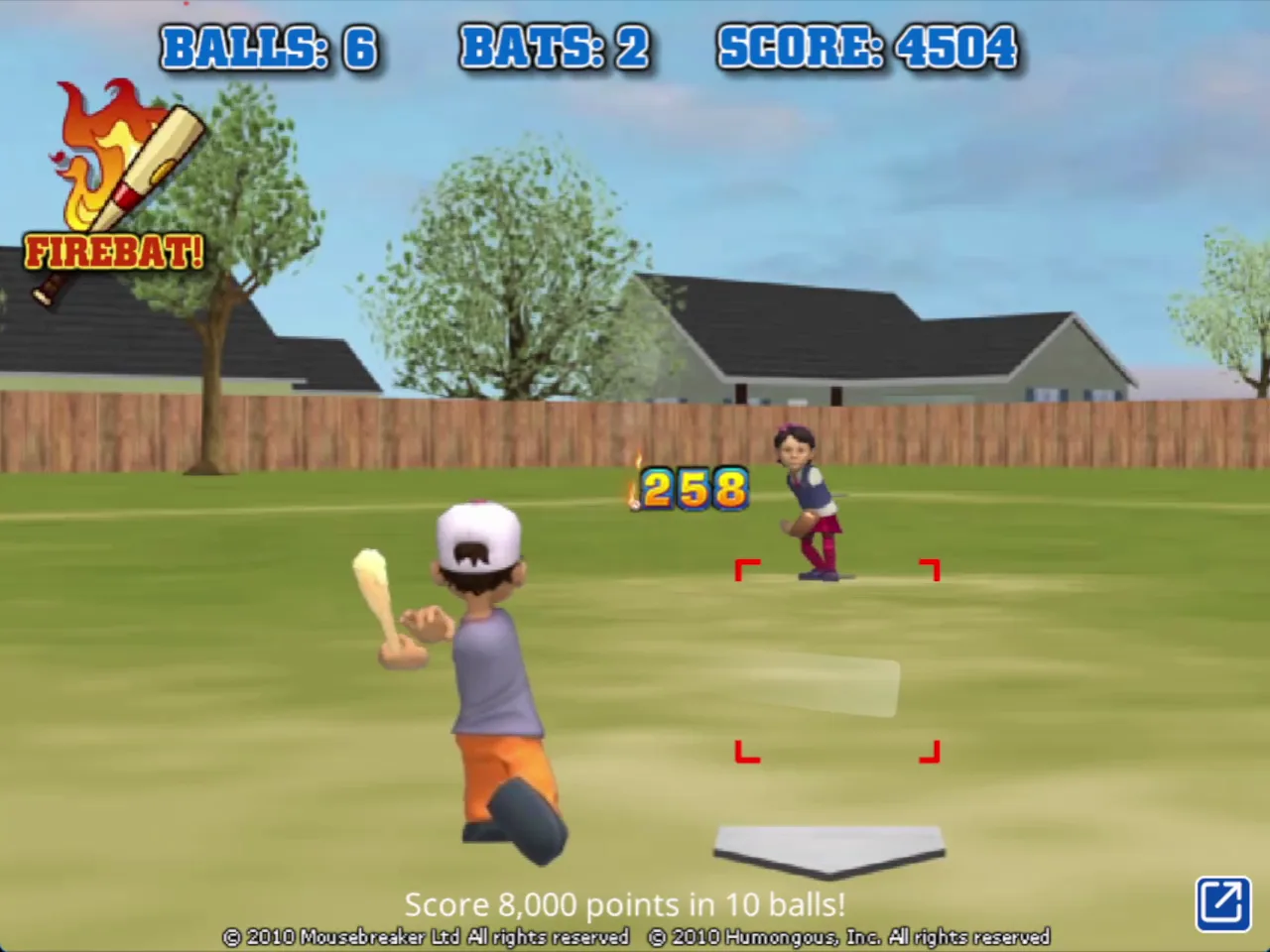
Batting here is built on simple inputs. On a computer, move the mouse to get the best position, then left click to play the swing. On a touchscreen, drag to get the best position and tap to play. That is the whole control set, and it keeps your eyes on the pitch instead of a button map.
The real skill is reading the ball. Watch it leave the pitcher's hand, judge where it is heading, and shift your position so your swing covers that spot. A good setup beats a frantic click every time. Rushing early or hanging back late are the two classic ways to whiff.
Timing also decides how much a hit is worth. A well-timed power swing can turn into an extra-base hit or a home run, and that shifts momentum fast. One clean connection can break open a tight inning and change how the rest of the match feels.
Think of each at-bat as a small puzzle. Where will the pitch land? Where should you stand? Answer those two questions and the swing becomes much easier to land.
Mound Strategy and Strikeout Setup
Pitching uses the same simple inputs as batting. Move the mouse or drag on touch to line up your throw, then click or tap to deliver it. The skill is in variety. If every pitch looks the same, batters will sit on it.
Mix your spots and your timing, and you can set hitters up for a strikeout. Keep them guessing, then finish with the pitch they did not expect.
Special Abilities and Signature Power-Ups
Mound Powers from Fireballs to Spitballs
The pitching side of Backyard baseball includes a trio of special tools: Fire Balls, Crazy Balls, and Spitballs. Each one bends the usual rules of a throw and gives the mound a flavor you will not find in a realistic baseball sim. They are part of what makes a pitcher feel like a character instead of a stat line.
Fire Balls bring the heat and set the tone for a power pitcher. Crazy Balls live up to the name, adding chaos that keeps hitters off balance. Spitballs add a sneaky, trickster feel to your arsenal.
Use them like seasoning, not the main meal. If you throw a special pitch every time, batters adjust and the surprise is gone. Save a power for a key out, then go back to your normal mix so the next one still catches them off guard.
Batting Enhancements and the Aluminum Power Bat
Hitters get their own bag of tricks. The Aluminum Power Bat, ground-skipping Undergrounders, and erratic Crazy Bunts give batters supernatural hitting abilities. A well-timed power swing can guarantee extra-base hits or home runs, turning a quiet inning into a big one.
Undergrounders keep the ball skipping along the ground, while Crazy Bunts add unpredictable movement that can rattle a defense. Pick your moment, then commit to the swing.
Want more diamond action while you wait for the next at-bat? Try BASEBALL 9 or Baseball Bros right here.
Roster Construction and Matchup Rules
Drafting Balanced Neighborhood Lineups
Building your team is half the fun. You pick from a playable roster led by Pablo Sanchez and the Backyard Kids, so every draft starts with a simple question: who do you want on your side? Pablo is the obvious headline pick, but a smart lineup looks beyond one name.
Think in terms of balance. Fast runners put pressure on the defense and stretch singles into more. Power hitters change the score in a single swing. A team that leans too far in one direction leaves a gap the other side can use.
Defense matters too. Put your steadier fielders where the ball is most likely to go, and you will turn more close plays into outs. A lineup that can hit, run, and catch will carry you through almost any matchup.
Inning Structure and Run Limits
Matches follow casual sandlot rules and play out as single-game contests. That keeps each game short and easy to restart whenever you want another go.
Because the format is relaxed, one big inning can swing everything. A home run from a power swing can flip a game in seconds, so stay patient and keep chasing that clutch hit.
Platforms and the Evolution of Backyard baseball
From 1997 CD-ROM to Browser Play
The story starts with the 1997 PC debut from Humongous Entertainment, the release that launched the entire Backyard Sports franchise. From there, the series spread across the years, reaching Game Boy Advance and GameCube during the early 2000s. Each new platform carried the sandlot charm to a fresh audience.
Today you can enjoy that same spirit in a browser. Controls stay simple, which suits quick sessions and short breaks.
Modern Console and PC Re-Releases
The franchise has also returned through commercial re-releases. Mega Cat Studios and Playground Productions handle modern revivals across PC and consoles, including Steam, Switch, and PS5, bringing the neighborhood back to a new generation.
Want to keep the sports streak going? Check out more games in Sports and keep swinging.
Shares the full core gameplay of batting, pitching, and fielding in cartoon-styled baseball matches, but with deeper squad management and stat progression.
Shares the same core baseball batting and pitching mechanics in an arcade-style format, but focuses on streamlined head-to-head multiplayer rounds.
🎯 Fun Facts About Backyard baseball
Pablo Sanchez became a cultural gaming icon due to his maximum ratings across nearly every skill category.
✨ Key Features of Backyard baseball
Playable roster featuring Pablo Sanchez and the Backyard Kids
Special pitching power-ups including Fire Balls, Crazy Balls, and Spitballs
Super hitting tools including Undergrounders, Crazy Bunts, and the Aluminum Power Bat
Simple mouse and touchscreen batting and pitching mechanics
Casual sandlot baseball regulations across single-game contests
How to Play Backyard baseball
Step 1: Use the game controls
Use Move mouse to get best position. Use Left click to play. Use Drag to get best position. Use Tap to play.
Step 2: Select Your Game Mode
Choose between launching a quick pick-up game or organizing a full sandlot exhibition contest.
Step 3: Assemble Your Lineup
Draft your squad from the neighborhood roster, placing dependable hitters like Pablo Sanchez into high-impact spots.
Step 4: Position Your Defense
Assign capable gloves to the infield and outfield, placing your most reliable pitcher on the rubber.
Step 5: Bat with Precision
Track incoming pitches over the plate and click to drive line drives, grounders, or deep fly balls into open grass.
Step 6: Deliver Strategic Pitches
Target the edges of the strike zone and deploy specialty throws like Fire Balls to keep rival batters off balance.
Backyard baseball FAQs
What are the basic controls for Backyard baseball?
Browser mouse: Move mouse — get best position; Left click — play. Mobile: Drag — get best position; Tap — play.
Can I play Backyard baseball on mobile devices?
Yes. Backyard baseball runs in your phone or tablet browser, and it has touch controls. There is also a mobile app.
Do I need to download Backyard baseball?
No. Backyard baseball runs in your browser on this page, with nothing to download or install.
What can I play Backyard Baseball on?
You can play it in web browsers without installation. The original '97 edition and modern franchise entries also appear on Steam for PC and Mac, PlayStation 5, and Nintendo Switch.
What special power-ups exist in the game?
Pitchers can unlock special deliveries like the Fireball, Spitball, and Crazy Ball. Hitters counter with powerful boosts like the Aluminum Power Bat, Crazy Bunt, and Undergrounder.
Backyard baseball, first released in 1997, is a single-player arcade sports game that turns the diamond into a playground of supernatural hitting. The Aluminum Power Bat, ground-skipping Undergrounders, and erratic Crazy Bunts give every at-bat a thrill, and a well-timed power swing can deliver an extra-base hit or a home run that breaks open a close inning.
It's easy to pick up, too. On desktop, move your mouse to get the best position and left click to play. On mobile, drag to get into position and tap to play. It runs in your browser, on mobile, and on desktop, so you can jump in anywhere.
Ready to swing for the fences? Play Backyard baseball right here on this page and see how many close innings you can bust wide open.
Backyard baseball Game Image
Game Controls
Move mouse
Get best position
Left click
Play
Drag
Get best position
Tap
Play
No comments yet. Be the first to share your thoughts!



No comments yet. Be the first to share your thoughts!