Pitch ball, slide, dive, or change directions - Player 1
Move - Player 2
Pitch ball, slide, dive, or change directions - Player 2
UI
Move
Pitch ball, slide, dive, or change directions
Game Details
Technology: HTML5
Playable on: Browser
Platforms: Mobile, Desktop
Genre: Arcade Sports
Original developer: Blue Wizard Digital
Developed by Blue Wizard Digital as part of their popular sports arcade series, Baseball Bros adapts the studio's recognizable pick-up-and-play format into competitive diamond matchups.
Baseball Bros turns a full baseball game into a quick, reaction-driven duel where one well-timed press decides everything. Blue Wizard Digital built it as a fast sports arcade title, and it shows in every pitch. There are no long menus or slow setup, just a pitcher, a batter, and a ball that moves fast.
The studio also made BasketBros and Soccer Bros, and Baseball Bros uses the same pick-up-and-play style on the diamond. Expect wild hits, ragdoll dives in the outfield, and pitches that bend in ways a standard sim never would. You learn the controls in a minute, but timing takes real practice.
Jump in, throw a few pitches, and see how quickly the rivalry heats up. Start your first match here and see if you can win it.
What Makes Baseball Bros Unique
Fast-Paced Inning Structure
Most baseball games ask for patience. Baseball Bros asks for reflexes. Each duel is built around timing and reaction speed, so you spend your time pitching, swinging, and running instead of watching long animations. The pace stays high from the first pitch to the final out.
Think of each inning as a short burst of decisions. You pitch, the batter reacts, the ball flies, and the play is over before you can get comfortable. That rhythm keeps matches tight. One mistake on a single pitch can hand the other side a run.
The control scheme backs this up. On keyboard in single-player, you move with the Arrow Keys and use the Space Bar to pitch the ball, slide, dive, or change directions. One button covers several jobs, so you always need to know which moment you are in. On mobile, you drag the icon in the bottom left to move and tap the icon in the bottom right for the same action.
That shared action button is the heart of the game's speed. You never stop to pick from a long list of options. You read the play, press once, and live with the result. If you like sports games that respect your time, this is one of the quickest ways to get a full match in.
Exaggerated Physics and Hits
Ragdoll physics give every play a loose, comic feel. Outfielders do not glide to the ball. They dive, flop, and tumble, and sometimes that scramble is what saves a run. Big hits look just as wild, with the ball launching in ways that feel more like a cartoon than a stat sheet.
Pitches add to the chaos. The game includes fastballs, curveballs, and knuckleballs, and the knuckleball can shift unpredictably mid-flight. You cannot rely on one habit for long, because the ball will not always travel the way you expect.
Mastering the Batter's Box
Swing Timing and Contact
Good batting starts with patience. Because the game rewards timing over raw force, the best swing is the one that meets the ball at the right instant, not the earliest one. Wait, watch the delivery, and commit only when the pitch is close enough to read.
Your swing uses the same single action input as everything else. On keyboard, that is the Space Bar in single-player. In two-player matches on a shared keyboard, Player 1 uses the G key and Player 2 uses the L key. On mobile, you tap the icon in the bottom right. Keep your finger ready, but do not mash. Rapid, panicked presses cost you clean contact.
Solid contact is what produces the exaggerated hits the game is known for. A well-timed connection sends the ball deep, while a rushed swing often gives the defense an easy play. Treat each at-bat as its own small puzzle. If you swung early last time, hold back a touch longer on the next pitch.
Try this for practice: ignore power for a few innings and focus only on making contact. Once your timing feels steady, you will notice the strong hits start to happen on their own. Consistency first, fireworks second.
Pitch Recognition
Reading the pitcher is half the battle. Fastballs arrive quickly and straight, curveballs bend away from where you first saw them, and knuckleballs wobble in ways that can fool even a careful eye. Each type asks for a slightly different swing moment.
Watch the ball early and track its path before you decide. When a knuckleball drifts, do not chase it. Let it settle, then react. Over several innings, you will start to feel which pitch is coming just from how it leaves the pitcher's hand.
Competing in Baseball Bros Game Modes
Solo Matchups Against AI
Single-player is the easiest way to learn the game. You face an AI opponent, which gives you room to test your timing without any pressure from a friend sitting beside you. Each match is a clean one-on-one baseball duel, and you can repeat it as often as you like.
On mobile, the drag icon and the tap icon do the same job.
Desktop players also have a second option. Two people can share one keyboard for a head-to-head match, with Player 1 on the WASD keys and G, and Player 2 on the Arrow Keys and L. That makes a good rivalry setup once you have the basics down. Start solo, sharpen your reads, then challenge a friend.
Franchise Mode Progression
It also raises the challenge. Because you are playing a run of games instead of a one-off, steady play matters more than a lucky inning. Treat each match as a step in a longer climb. Try Baseball Bros right here and see how far your squad can go.
Screenshot of the Baseball Bros Day 1 Games list, pairing 15 teams head to head before the PLAY! button.
Base Running and Match Decisions
Timing Aggressive Steals
Running is where bold players gain an edge. The Space Bar on keyboard, or the tap icon on mobile, lets you slide, dive, or change direction, so one input covers your key base running moves. Knowing when to use it is the real skill.
Go for an aggressive steal when the defense looks distracted or the pitch is slow to arrive. Slide late and you risk being tagged. Slide too early and you waste the burst. Watch the fielders, wait for a gap, then commit. A smart steal can turn a quiet inning into a scoring chance, but a reckless one hands the other side a free out.
Win and Loss Outcomes
Matches come down to runs. Score more than your opponent by the end and you win. Every out you earn on defense and every base you take on offense feeds that final total.
Shares the same reflex-based bat-and-ball timing mechanics, but follows cricket rules instead of baseball.
✨ Key Features of Baseball Bros
Fast-paced arcade baseball duels emphasizing timing and reaction speed
Multiple pitch deliveries including fastballs, curveballs, and knuckleballs
Ragdoll physics driving dynamic outfield dives and exaggerated hits
Single-player AI matches alongside shared-keyboard local multiplayer on desktop
Full HTML5 browser performance supporting PC, Chromebook, and mobile devices
How to Play Baseball Bros
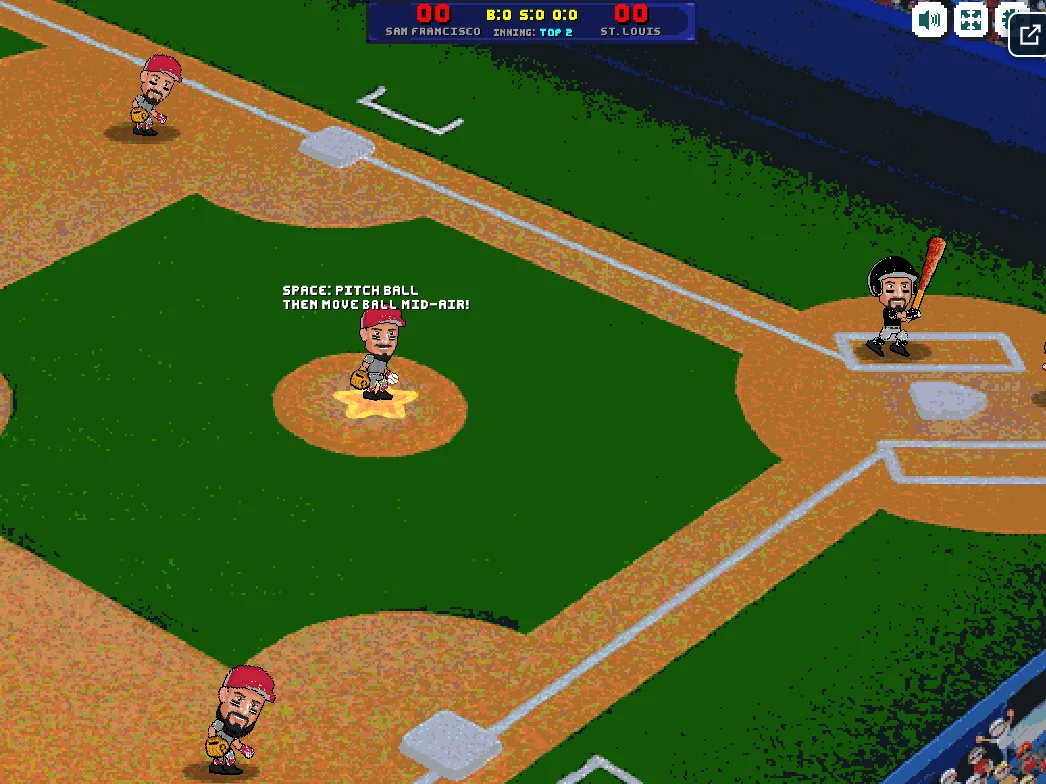
Press Space to pitch, then move the ball while it is in the air, as the prompt on the field describes.
Step 1: Select Your Match Mode
Choose between single-player matches against computer AI, franchise mode campaigns, or local head-to-head showdowns on your desktop browser.
Step 2: Read the Pitch from the Mound
Watch the opposing pitcher's windup and release angle closely to distinguish incoming fastballs from breaking curveballs.
Screenshot from a phone: the pitcher stands on the mound while the on-screen text reads PRESS: PITCH BALL, THEN MOVE BALL MID-AIR.
Step 3: Time Your Batting Stroke
Press your action key or tap the hit button just as the ball reaches the strike zone to drive hits into open turf.
Step 4: Run the Bases Aggressively
Direct your runners forward immediately after clean contact, choosing whether to hold at first or take extra bases on bobbled grounders.
Step 5: Execute Precise Defensive Plays
Switch to defensive fielding when in the field, tracking fly balls and pressing your dive or slide key to rob extra-base hits.
Baseball Bros FAQs
What are the basic controls for Baseball Bros?
Keyboard (Single Player): Arrow Keys - move; Space Bar - pitch ball, slide, dive, or change directions. Keyboard (Player 1): WASD Keys - move; G Key - pitch ball, slide, dive, or change directions. Keyboard (Player 2): Arrow Keys - move; L Key - pitch ball, slide, dive, or change directions. Mouse: Left Mouse Button - ui. Touch: Drag the Left-Bottom icon - move; Tap the Right-bottom icon - pitch ball, slide, dive, or change directions.
Can I play Baseball Bros on mobile devices?
Yes. Baseball Bros runs in your phone or tablet browser, and it has touch controls.
Do I need to download Baseball Bros?
No. Baseball Bros runs in your browser on this page, with nothing to download or install.
Conclusion
Baseball Bros is an arcade sports game from Blue Wizard Digital that brings quick, easy-to-learn baseball action to your browser, whether you're on desktop or mobile. Controls stay simple: move your player, then use a single action button to pitch, slide, dive, or change directions.
Franchise Mode is where the game really shines. You build and manage a baseball squad through consecutive matches, chasing league trophies and facing tougher competition than any single exhibition game offers. Prefer a friendly rivalry? Two players can share a keyboard in multiplayer.
Ready to step up to the plate? Start playing Baseball Bros right here on this page and see how far your squad can go.
Baseball Bros Game Image
Game Controls
Arrow Keys
Move
Space Bar
Pitch ball, slide, dive, or change directions
WASD Keys
Move - Player 1
G Key
Pitch ball, slide, dive, or change directions - Player 1
Arrow Keys
Move - Player 2
L Key
Pitch ball, slide, dive, or change directions - Player 2
Left Mouse Button
UI
Drag the Left-Bottom icon
Move
Tap the Right-bottom icon
Pitch ball, slide, dive, or change directions
No comments yet. Be the first to share your thoughts!





No comments yet. Be the first to share your thoughts!