Conceived and developed by independent creator Zihit under the studio name Punyrobot, the game combines retro 1990s arcade football sensibilities with dynamic ragdoll simulation physics.
Super Liquid Soccer turns a quick 7-a-side match into a wobbly, slippery fight where every sprint can send your striker tumbling. Punyrobot, the studio name of independent creator Zihit, built it in Godot and released it in 2022. It blends retro 1990s arcade football with floppy ragdoll physics, so even a simple turn feels like a small gamble.
You control a squad from an international roster and face the computer in every match. The game runs directly in your browser and works on a phone too. You use the keyboard on desktop and on-screen buttons on a touchscreen.
This guide covers how the physics behave, how to pass and shoot, how the bracket works, and how to stay organized at the back. Jump in and try Super Liquid Soccer right here while you read.
Physics and Momentum in Super Liquid Soccer
Managing Player Wobble
Your players are not rigid. Their joints act rubbery and unstable, so abrupt turns, high-speed sprints, and collisions all shake their balance. When balance goes, your shot trajectory changes with it. A strike taken mid-stumble rarely flies where you aimed.
The fix is to move early. Start your turn before you reach the ball instead of snapping around at the last moment. Wide, gentle arcs keep a runner steady, while a hard reversal at top speed leaves him flailing. Think of each run as a curve you set up two steps ahead.
Ball contact follows the same rule. Settle into a steady line, then shoot or pass. If you just crashed into a defender, wait a beat for the wobble to fade. A calm player hits cleaner, and a falling one hits the stands.
Executing Sliding Challenges
Mistimed tackles are costly here. The elastic body often sends your player skidding straight past the ball, leaving a gap behind you. Save the slide for loose balls and clear breakaways, not for every contested touch.
Stay on your feet while the attacker still has the ball tight to his body. Move in only when the touch gets heavy and the ball rolls free.
Mastering the Passing and Shooting Mechanics
Ground Passes and Through Balls
Press M for a ground pass. It is your safe, everyday tool for moving the ball between teammates along the grass. Short passes keep possession and pull the computer defenders out of shape.
Press I for a through pass. This one targets the space ahead of a runner rather than the runner himself. Use it when a teammate is breaking toward goal and a defender stands between you. Send the ball into the gap and let your attacker run onto it.
Mix the two. A few quick M passes drag the defense sideways, then one I ball splits it open. Because the pitch is small, space closes fast, so the through pass works best the moment a lane appears. Watch your passer's balance too. A wobbling player sends a weaker, less accurate ball.
Lofted Chips and Power Strikes
Press J to shoot or head the ball. It is the direct option, best when you have a clear look at goal and a steady stance. Compare that to a simple pass: a pass places the ball, while J commits to the finish.
Chip when defenders block the lanes, shoot when the lane is open.
Navigating International Tournament Brackets
World Cup Elimination Structure
To start, scroll through the available international squads and pick your country. That choice puts you into the World Cup and Championship brackets. Every match is against the computer, so you are always facing a bracket opponent rather than a friend.
The bracket is a ladder, and a ladder punishes mistakes. One lost match ends the run, so a careless backline costs far more than in a casual kickabout. A single wobbling defender or a rash slide can hand the computer the goal that decides everything.
Play the early rounds with patience. Protect your shape first and take chances second. Winning ugly keeps your run alive, and a tight 1-0 counts the same as a thrashing. Press Escape any time you need a moment to pause and think.
Overcoming Computer Difficulty
The computer squads react to loose balls and punish counter-attacks, so reckless pressing backfires. Draw them out with short M passes, then use a through ball or an L chip behind the line. Be patient and wait for a clean angle before you shoot.
Tactical Strategies for Super Liquid Soccer
Sprinting with the P Key
Hold P to sprint. Speed wins races to loose balls, but it also invites trouble, because high-speed running destabilizes your player. The faster you go, the harder it is to turn, strike, or stop cleanly.
Treat sprint as a burst, not a default. Use it to chase a long ball or to recover when the computer breaks through. Then ease off before you need to shoot or tackle. Arrive at the ball under control rather than flying in and spinning out.
A good habit: sprint in straight lines and slow down for corners. Straight runs keep your balance, while sprint-and-swerve sends players tumbling.
Defensive Positioning in 7-a-Side
With only seven players, one missing defender leaves a huge hole. After you attack, drop back quickly and keep a body between the ball and your goal. When the computer counters, stay goal-side and avoid diving in. Your goalkeeper and a calm backline will handle most breaks.
Ready for a real test? Start a World Cup run in Super Liquid Soccer now and put these habits to work.
Keyboard and Touchscreen Control Configurations
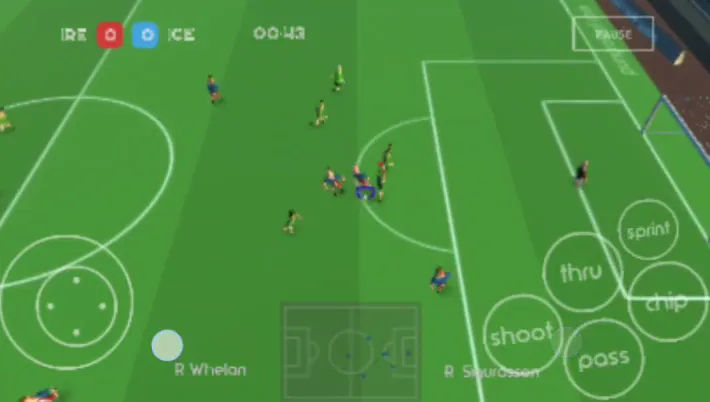
Screenshot from a phone: The touch buttons on the right, labelled shoot, pass, chip, thru and sprint, sit over the pitch while the movement control stays on the left.
Desktop Input Layout
Move with the WASD keys or the arrow keys. Pick whichever feels natural, since both do the same job. Your other hand handles the actions: P to sprint, M to pass, I for a through pass, J to shoot or head, and L for a lofted chip.
Press Escape at any time to pause. Keep your fingers resting near the action keys so you can pass and shoot without hunting for them. If you like variety, you can also try other sports games on the Sports page.
Mobile Virtual Interface
On a phone or tablet, the icon buttons at the bottom left are for movement. Drag them to run your player around the pitch. The icon buttons at the bottom right are for playing, so tap them to pass, shoot, and more. Keep your thumbs steady, because the same wobble rules apply on a touchscreen.
Same responsive, competitive arcade sports gameplay and round structure, but focused on basketball shooting and defending rather than soccer.
✨ Key Features of Super Liquid Soccer
Floppy ragdoll physics that make running, tackling, and shooting delightfully chaotic
Fast-paced 7-a-side match format that keeps action centered around both goal mouths
Full international squad selection allowing players to compete in World Cup tournament ladders
Dual control compatibility supporting desktop keyboard layouts and touchscreen virtual overlays
Challenging single-player AI opponents that adapt to loose balls and attacking counter-plays
How to Play Super Liquid Soccer
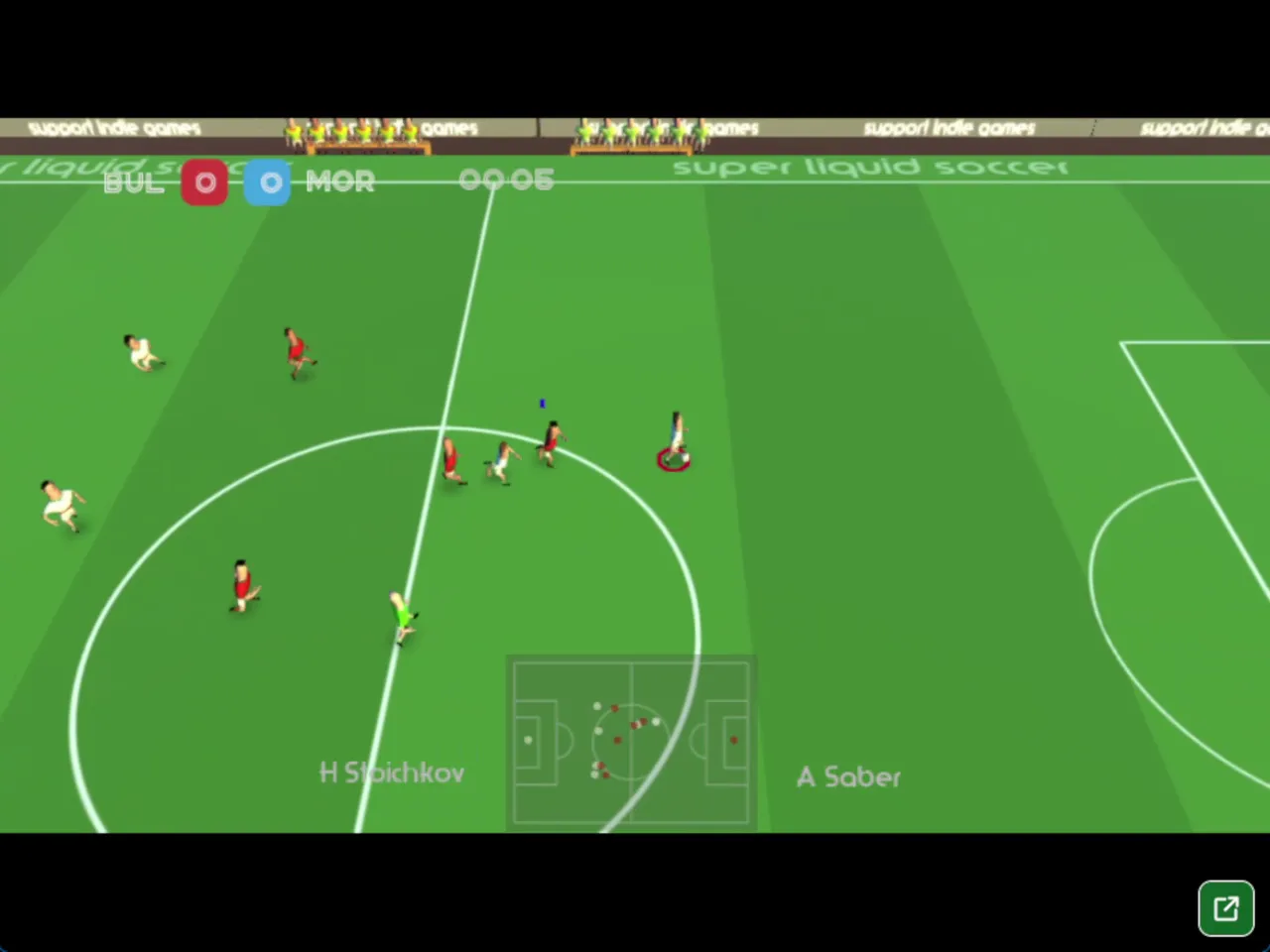
Screenshot from a desktop view of the Super Liquid Soccer game: a match between BUL and MOR, with the score at 0 to 0 and the timer at 00:05.
Step 1: Use the game controls
Use WASD Keys to move the player. Use Arrow Keys to move the player. Use P Key to sprint. Use M Key to pass.
Step 2: Select Your Tournament and Country
Scroll through the roster of available international squads on the main menu and pick your preferred nation to enter the bracket.
Step 3: Kick Off and Establish Possession
Use WASD or the Arrow keys to move into open space, distributing short ground passes with the M key to avoid aggressive AI pressing.
Step 4: Break Through the Defensive Line
Send attacking teammates into open turf using the I key for through balls, or use the L key to chip crosses over sliding defenders.
Step 5: Execute Your Shot on Goal
Line up your angle toward the net and press the J key to unleash a driven ground shot, diving header, or volley past the opposing goalkeeper.
Super Liquid Soccer FAQs
What are the basic controls for Super Liquid Soccer?
Keyboard: WASD Keys or Arrow Keys - move the player; P Key - sprint; M Key - pass; J Key - shoot or header; L Key - chip pass, cross, or slide; I Key - through pass; Escape Key - pause to exit. Touch: Drag the left-bottom icons - move; Tap the right-bottom icons - play.
Can I play Super Liquid Soccer on mobile devices?
Yes. Super Liquid Soccer runs in your phone or tablet browser, and it has touch controls.
Do I need to download Super Liquid Soccer?
No. Super Liquid Soccer runs in your browser on this page, with nothing to download or install.
Does the browser version of Super Liquid Soccer support multiplayer?
Super Liquid Soccer is listed as Single-player.
Conclusion
Super Liquid Soccer, a 2022 arcade sports game from Punyrobot built in Godot, turns the beautiful game into a wobbly, unpredictable contest. Its liquid ragdoll physics mean abrupt turns, sprints, and collisions throw players off balance, so success comes from smart positioning and steady control rather than twitchy movement.
With simple controls for passing, through passes, shooting, headers, and sprinting, it is easy to pick up in single-player matches on browser, mobile, or desktop. The rubbery chaos keeps every play entertaining.
Ready to take the pitch? Start playing Super Liquid Soccer right here on this page and see how well you can tame the wobble.
Super Liquid Soccer Game Image
Game Controls
WASD Keys
Move the player
Arrow Keys
Move the player
P Key
Sprint
M Key
Pass
J Key
Shoot or header
L Key
Chip pass, cross, or slide
I Key
Through pass
Escape Key
Pause to exit
Drag the left-bottom icons
Move
Tap the right-bottom icons
Play
No comments yet. Be the first to share your thoughts!



No comments yet. Be the first to share your thoughts!