Developed with Unity WebGL and launched across mobile and browser platforms, TapNation designed the title around accessible single-input timing physics that propel golf drives to astronomical scale.
Golf Orbit turns one click into a launch that can send a golf ball toward Mars. A single oscillating meter decides everything. You stop it, the ball flies, and the yardage becomes coins. That loop is simple, and it is the whole hook.
TapNation built the game around one input and a lot of timing. There is no aiming mess and no menu maze before your first drive. You hit, you watch the distance climb, and you want one more try.
Start your first swing here and see how far one click can take you.
Golf Orbit Timing and Launch Mechanics
The Oscillating Power Meter
Every drive starts with the One-Shot Power Meter. It is a gauge that sweeps back and forth, tracking swing strength and accuracy. You get one input to lock it in. On desktop, press the Left Mouse Button. On mobile, tap. Either way, the ball launches at the power level on the meter at that exact moment.
That makes timing the only skill that matters. There is nothing else to fiddle with while the needle moves. Your eyes stay on one spot, and your finger waits for one beat.
Start by watching the meter for a full sweep or two before you commit. Do not click the instant a round begins. The needle has a rhythm, and you want that rhythm in your head before you act on it. A calm first read beats a rushed click almost every time.
Next, pick a visual anchor. Choose the point on the gauge where you want to stop, and fix your attention there instead of chasing the needle across the whole bar. Players who track the moving needle tend to click late. Players who watch the target zone and react as the needle arrives click closer to the mark.
Mouse and tap feel slightly different. A mouse click is quick and precise, so rest your finger on the button and press down in one motion. On a phone or tablet, tap with a steady finger and avoid hovering above the screen, because a late lift is easy to mistake for a late press. Pick one hand position and keep it for every drive. Consistency teaches your muscles the delay between thought and click.
Build a short routine, too. Watch one sweep, set your eyes on the target, then click on the next pass. Repeating the same three steps each time turns timing into habit. When a drive goes wrong, you can check the routine instead of guessing what happened.
Treat bad shots as data. If your ball falls short, ask yourself whether you clicked early or late. If you cannot tell, slow down and watch the next sweep with that question in mind. Over several drives you will notice a pattern, and fixing a pattern is far easier than fixing a mystery.
The payoff for all this is distance. Golf Orbit is built so that drives can reach interplanetary thresholds, carrying a ball from Earth toward Mars. Each small improvement in timing shows up as extra yardage, and extra yardage becomes extra coins. That link between a clean click and a bigger reward keeps each swing worth taking seriously.
Stay patient and stay loose. A tense hand clicks badly. Breathe, wait for the beat, and let the meter come to you.
Upgrades and Coin Progression
Maximizing Flight Earnings
Coins in Golf Orbit come straight from how far your drive goes. The more yardage you achieve per shot, the more you earn. That puts a clear value on every click: a better swing pays more, and a weak swing pays less.
Those coins are not just a score. They fund upgrades to launch distance, along with characters and environments. Spend them, and your next drive can start from a stronger place than your last one. This is how the game pushes you past the limits you hit early on.
The smart habit is to spend regularly instead of hoarding. A bank of unspent coins does nothing for your distance. Each upgrade you buy makes the next round longer, and a longer round earns more coins to spend again. The loop feeds itself, so skipping it only slows you down.
Pay attention to where your drives stall. If you keep ending near the same distance, that wall is your cue to invest. Use your coins to push the launch-distance side of your setup, then try the same timing again and compare. A real jump in yardage tells you the upgrade worked. If nothing changed, your timing is probably the weak point, and practice will help more than another purchase.
Do not chase every shiny option at once. Characters and environments cost coins too, and they are part of the long game. Think of upgrades as the thing that carries you through the next stretch, and cosmetic or world unlocks as rewards for steady play. Keep your swing sharp first, because earnings follow the quality of the drive, not the size of the wallet.
One more tip: judge progress by your best drives, not your average ones. A single great swing shows what your current setup can do. Aim to repeat it, and treat the gap between your best and your usual as the thing to close.
Unlocking Golf Orbit Characters and Courses
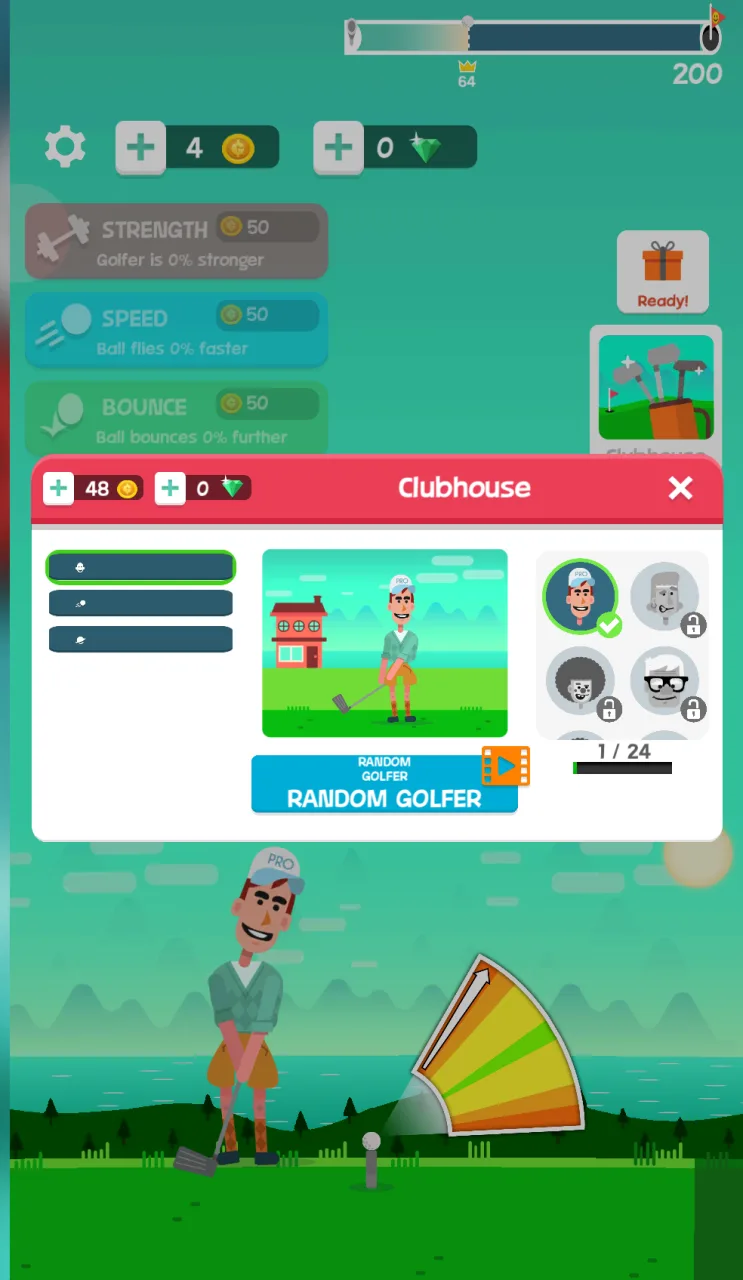
Screenshot of Golf Orbit: the Clubhouse window lists golfers, with padlocked ones beside the Random Golfer card and a 1 / 24 counter.
The 24 Character Roster
Golf Orbit has a roster of 24 distinct golfer characters, unlocked through gift boxes. In this browser build, the clubhouse shows 24 players, and 23 of them start locked. They open as you make progress, so there is always another golfer waiting ahead. The clubhouse also lists 5 locked golf balls.
The game also supports custom clubs, which adds another layer to what you collect. Your coin earnings from long drives feed the whole system, so every good swing moves you closer to the next unlock.
On the course side, this build offers an open world, plus two locked worlds that are coming soon. The overall arc moves from ordinary greens toward deep space and Mars, so the scale of your drives keeps growing as you advance.
If you enjoy tapping for distance, try Golf Hit or Tap Tap Shots for more quick-timing fun. You can also browse the full Sports collection. Then jump back into Golf Orbit and chase your next unlock.
Shares the simple one-button timing and quick score-chase loop, but you tap to bounce a basketball into hoops rather than launching a golf ball for distance.
🎯 Fun Facts About Golf Orbit
The game is officially known under both Golf Orbit: Oneshot Golf Games and Golf Orbit: Perfect Swing on mobile app platforms.
Drives can reach interplanetary thresholds, allowing golf balls to travel from Earth toward Mars.
✨ Key Features of Golf Orbit
Extreme flight distances extending into orbit and toward Mars
Coin economy tied directly to yardage achieved per drive
24 unlockable golfer characters and custom clubs
How to Play Golf Orbit
Step 1: Use the game controls
Use Left Mouse Button to launch ball at current power level. Use Tap to launch ball at current power level.
Step 2: Line Up the Swing
Watch the oscillating power gauge sweep back and forth above your golfer at the tee.
Step 3: Time Your Input
Left-click or tap the screen when the meter needle reaches peak launch power.
Step 4: Collect Coin Rewards
Wait for the ball to complete its ground rolls, then collect earned coins based on final distance.
Step 5: Upgrade Your Equipment
Spend your coins in the upgrade menu to increase power ratings and unlock gift boxes before the next swing.
Golf Orbit FAQs
What are the basic controls for Golf Orbit?
Browser mouse: Left Mouse Button — launch ball at current power level. Mobile: Tap — launch ball at current power level.
Can I play Golf Orbit on mobile devices?
Yes. Golf Orbit runs in your phone or tablet browser, and it has touch controls. There is also a mobile app.
Do I need to download Golf Orbit?
No. Golf Orbit runs in your browser on this page, with nothing to download or install.
Conclusion
Golf Orbit, released in 2024 by TapNation, is an arcade distance golf game that boils the sport down to a single, satisfying decision. Its one-shot power meter oscillates back and forth, and your job is to lock in the swing with perfect timing. It's simple to grasp, yet each launch feels like it matters.
Built on Unity WebGL, it runs smoothly in your browser on desktop or mobile. Click the left mouse button or tap the screen to launch the ball at the current power level. As a single-player experience, it's perfect for quick sessions whenever you want a fast, easy-to-learn challenge.
Ready to take your best shot? Play Golf Orbit right here on this page and see how far you can send that ball.
Golf Orbit Game Image
Game Controls
Left Mouse Button
Launch ball at current power level
Tap
Launch ball at current power level
No comments yet. Be the first to share your thoughts!



No comments yet. Be the first to share your thoughts!